
DIY App Controlled Smart Christmas Lights | Control Pixel LEDs via Wi-Fi | WLED - ESP8266 Tutorial
Project Information & Downloads.
Everything you need to understand, build and program this project.
About this project.
Control addressable Christmas lights, a decorative LED cone or a night lamp over Wi-Fi with a NodeMCU ESP8266 and WLED. The video demonstrates a mobile-app-controlled build and reports testing up to 750 LEDs; the LED power supply must be sized independently for the actual installation.
The demo uses a cone approximately 10 cm across the base and 30 cm tall, made from reused X-ray film, with 1 m of 144 LEDs/m WS2812B strip. Connect your phone and NodeMCU to the same Wi-Fi network as demonstrated in the video. Explore more in the Christmas LED Decorations playlist.
What you need.
The controller, LEDs, electronic components and supporting hardware required for this build.
| Component | Details / supplier |
|---|---|
| NodeMCU ESP8266 development board (CP2102) | Duino.lk · eBay listing |
| 5 V WS2812B addressable LED strip, 144 LEDs/m | Used for the demonstration cone; confirm voltage and direction of data input. |
| Alternative: 5 V WS2811 pixel bulbs | Duino.lk listing |
| 5 V power supply and wiring | Choose a supply rated for the LED count and actual consumption; use suitable wire and protection. |
| Optional decorative cone | Approx. 10 cm base diameter and 30 cm height in the video. |
Connect the hardware.
Pin assignments, wiring information and connection diagrams for assembling the project correctly.
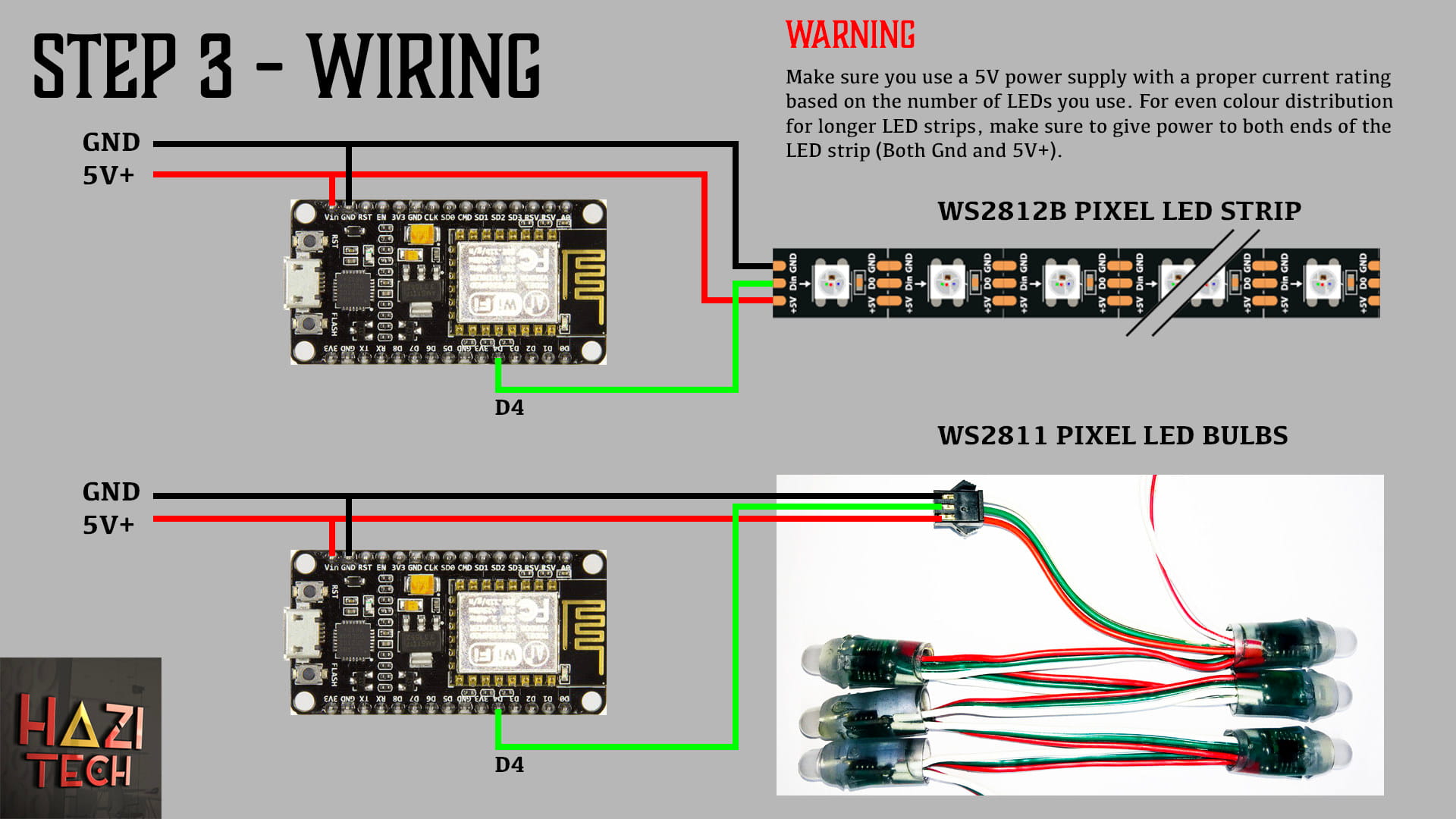
Connect NodeMCU D4 to the LED data input, share GND between NodeMCU and the LED power supply, and feed the LED strip or bulbs with the correct 5 V supply. The diagram shows both WS2812B strips and WS2811 pixel bulbs as alternative LED types.
Power warning: Choose the power supply current rating for your actual LEDs. The original tutorial gives approximate WS2811 figures of 50 LEDs / 1 A, 100 / 2 A, 150 / 3 A and 200 / 4 A; these are not universal maximum-current ratings. For longer strips, provide adequately protected power injection at both ends as appropriate. Do not power a large strip through the NodeMCU board.
Code & project files.
Download the firmware, source code and any supporting files provided for this project.
NodeMCU WLED Software Package
Original supplied ZIP includes WLED_0.11.0_ESP8266.bin and an ESPHome Flasher download-link text file. This is third-party software, not HAZI TECH firmware. Confirm compatibility with your ESP8266 before flashing.
Original sources: WLED releases · ESPHome Flasher releases.
NodeMCU V3 Stock FW
Original supplied ZIP containing NodeMCU V3 Stock FW.bin, for users who want to restore the supplied stock firmware after flashing. Check your board model and backup your existing firmware before flashing.